
DocsUser Interfaces
Alphanumeric viewer
A terminal view of one drone's sensors, pose, references and control modes.

The alphanumeric viewer shows one drone's state as text in a terminal. It only reads topics, so it's safe to leave running next to anything else, including over SSH on the drone's computer.
Running it
Run it in a terminal of its own, at least 80 columns by 24 rows:
ros2 run as2_alphanumeric_viewer as2_alphanumeric_viewer_node \
  --ros-args -r __ns:=/drone0
Add -p use_sim_time:=true in simulation. Run it with ros2 run rather than its launch file, so
that it gets the terminal's keyboard. Quit with Ctrl+C.
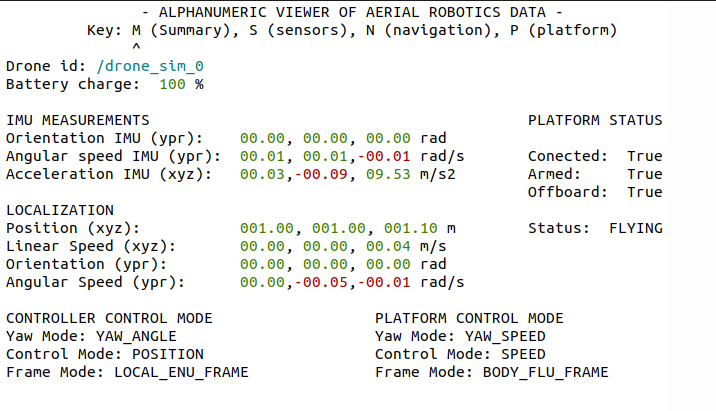
Tabs
| Key | Tab | What it shows |
|---|---|---|
M | Summary | IMU, localization, platform status, and the controller's and platform's control modes |
S | Sensors | Battery, IMU, speed, height and GPS |
N | Navigation | The height, IMU and localization |
P | Platform | Actuator commands, motion references, control modes and platform status |
Letters work in either case, and the left and right arrows move to the previous and next tab. A ^
under the key line marks the tab you're on.
Where the values come from
Every topic is read in the drone's namespace:
| Values | Topic |
|---|---|
| Position and orientation | self_localization/pose, in earth |
| Linear and angular speed | self_localization/twist, in base_link |
| IMU orientation, angular speed and acceleration | sensor_measurements/imu |
| Battery charge | sensor_measurements/battery |
| GPS latitude, longitude and altitude | sensor_measurements/gps |
| Connected, armed, offboard, status and platform control mode | platform/info |
| Controller control mode | controller/info |
| Actuator commands | actuator_command/pose, actuator_command/twist and actuator_command/thrust |
| References | motion_reference/pose and motion_reference/twist |
Angles are shown in radians, as yaw, pitch and roll in every tab but Platform, which shows roll, pitch and yaw. GPS coordinates are in degrees, with the altitude in meters.
Reading the values
- A value that hasn't arrived yet shows as dashes. Switching tabs clears every value to dashes until its next message.
- A value stays on screen after its topic stops, with no sign that it's old.
- Negative values are red and the rest are green. The battery is green above 50 %, yellow down to 20 % and red below that.
- Before
platform/infoarrives, the platform status shows its defaults, which read as disarmed. - Thrust, altitude above sea level and temperature always show dashes for now, and the actuator commands in the Platform tab aren't reliable.
Last updated on November 3, 2026